Google Translate
- 4.3
- Rating
- 1.00B
- Installs
- Free
- Price
 Analysis by App-foxy
When I need to understand a menu, sign, message, or short conversation in another language, Google Translate is usually the first tool I open. It is a free translation app from Google LLC in the Tools category, and its appeal is simple: it puts many different ways to translate in one familiar place instead of making me search for a separate tool for every situation. I have found it especially useful when speed matters more than producing polished, publication-ready wording.
That convenience does not mean every translation should be accepted without thought. Language depends on context, tone, regional habits, and sometimes humor that a direct conversion cannot fully carry. My experience is that this app works best as a practical bridge: it helps me understand what something probably means, prepare a basic reply, or get through an unfamiliar place. It is less suitable when a sentence has legal, medical, academic, or highly personal consequences.
How I decide whether Google Translate is the right tool
The first question I ask is not whether the app can translate a language, but what kind of translation I actually need. For a quick message from a hotel, a label in a shop, or directions on a street, convenience is the priority. For a contract, a formal presentation, or a sensitive conversation, accuracy of nuance matters much more than speed. Google Translate is strongest in the first group.
In-Depth Coverage of Google Translate
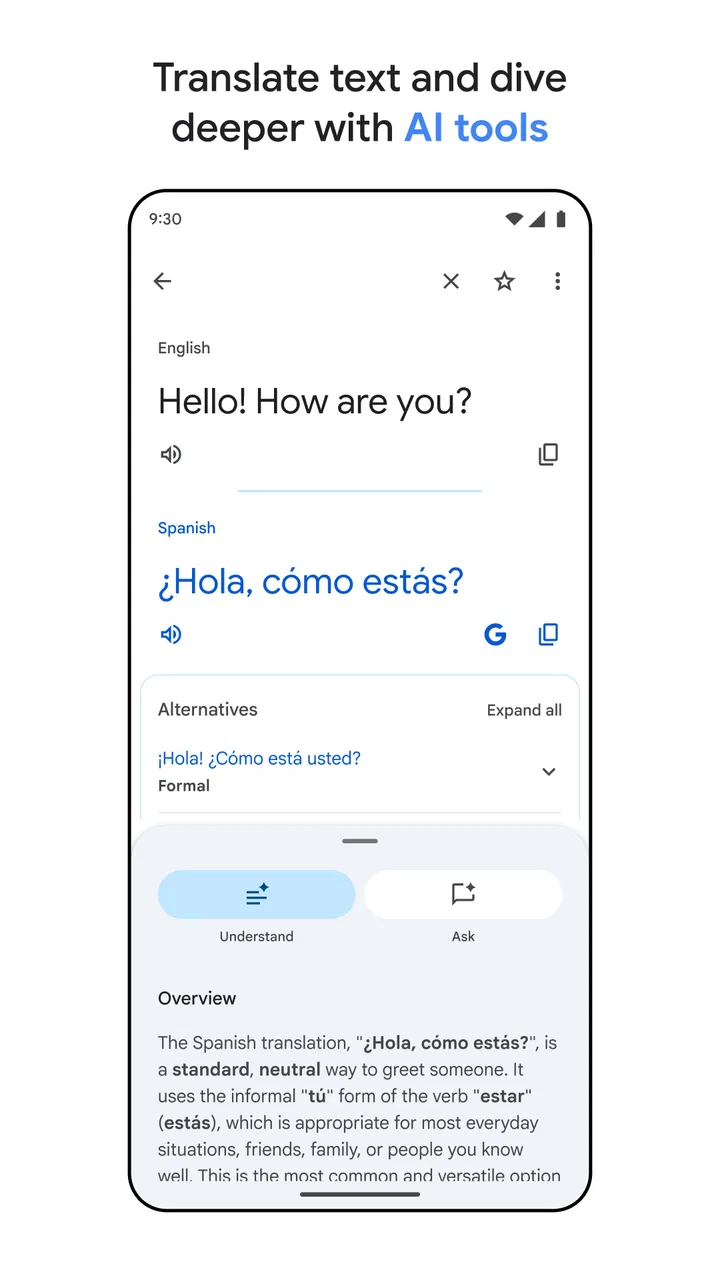
The app supports the everyday translation habits people actually use. I can type or paste text, speak a phrase, and use the camera for printed words. That range matters because the best input method changes from one moment to the next. Typing is more controlled, speech is faster, and camera translation is useful when copying the original text would be awkward or impossible.
I also judge a translation app by how quickly I can recover from a misunderstanding. If the first result sounds strange, I want to try a shorter sentence, change the wording, or check the source text again without starting over. This is where a broad, familiar app has an advantage over a narrow dictionary. It encourages a back-and-forth process rather than treating the first result as final.
My main decision rule is simple: use it to improve understanding, not to outsource judgment. A translated sentence can give me the direction of an answer while still needing a human check. This is particularly important when a small change in politeness, tense, or word choice could create confusion.
Text input is best when precision starts with you
When I have time to prepare a sentence, typing usually gives me the most useful starting point. I can remove unnecessary words, split a long thought into smaller parts, and see whether the result changes when the original wording changes. That process is more reliable than speaking a complicated idea in one breath and hoping the app catches every detail.
A practical habit is to write short, complete sentences instead of trying to imitate a whole conversation. “I need to change my reservation to tomorrow” is easier to check than a long explanation containing several times, conditions, and personal details. If the result looks unnatural, I simplify the source sentence and translate it again. This is not a flaw unique to this app; it is a sensible way to work with machine translation.
For travelers, students, and people communicating with relatives abroad, this approach can make the app feel far more dependable. I am not asking it to understand a complicated paragraph full of local references. I am giving it a clear task and then checking whether the result matches my intention.
Camera translation saves time, but the original image still matters
The camera feature is one of the most useful reasons to keep this app installed. When I face a printed notice, product package, menu, or sign, manually copying every word is slow and error-prone. Pointing the phone at the text lets me get the general meaning much faster, which is often all I need before deciding what to do next.
There is a trade-off. A blurry photo, decorative typeface, poor lighting, or crowded layout can make the result less dependable. I get better results by moving closer, holding the phone steady, and checking the source words rather than relying only on the overlay. If a translated warning appears unclear, I treat that as a reason to inspect the original more carefully, not as permission to guess.
This workflow is particularly helpful in a supermarket or train station. I can scan several labels or notices, identify the one relevant to me, and then use typed text for a closer look. The camera is therefore most valuable as a first pass. It reduces friction, but it does not remove the need for attention.
Speech is convenient for short exchanges
Speaking a phrase is useful when my hands are busy or when I need help quickly. I have found it suitable for simple questions such as asking where something is, confirming a time, or explaining a basic need. The less complicated the sentence, the more comfortable I am using the result immediately.
Speech becomes harder when there is background noise, several people talking, an unfamiliar accent, or a sentence with names and numbers. I try to speak in short pieces and pause between ideas. If the result seems wrong, I repeat the thought more plainly rather than simply saying the same sentence louder.
For a real conversation, I prefer using the app as a shared reference rather than pretending it is an invisible interpreter. Showing the translated text to the other person can make corrections easier. They may recognize that the wording is slightly off and suggest a clearer way to express the idea in their language.
You May Also Like

 Hill Climb Racing
Why Hill Climb Racing Still Turns Crashes Into One More Run
A tiny car, a bumpy hill and one more upgrade: Hill Climb Racing keeps resurfacing because its simple chaos makes every near-miss feel personal.

 AliExpress - Shopping App
AliExpress Makes Global Shopping Feel Personal, but Shoppers Bear the Risk
AliExpress turns a global marketplace into a pocket-sized discovery engine. Its reach is useful, its shopping loop compelling, and its trade-offs easy to miss.

 Lords Mobile: Kingdom Wars
Lords Mobile Is a Kingdom-Building Routine, Not a Quick Match
A case-by-case verdict on the building, battles, device demands, and social commitments that make Lords Mobile rewarding for some players and exhausting for others.

 PDF Scanner app - TapScanner
TapScanner Makes Paperwork Easier to Capture, Check, and Share
TapScanner makes scanning with a phone feel less like a rescue operation and more like a dependable step in getting work done. Its capture tools are useful, though not flawless.

 Block Blast!
Block Blast! Shows How Much a Puzzle Game Can Leave Out
A quiet grid game shows why puzzle players increasingly value instant clarity, repeatable skill and low-pressure play—and where the genre still needs to catch up.

 Family Space
Family Space Review: A Shared Routine That Makes Family Life Easier
A parenting app earns its place not by adding more noise, but by making everyday coordination easier. Family Space gets that balance mostly right.
More From Our News Desk
View All News


Why the app feels dependable for ordinary travel and daily tasks
The biggest strength is breadth. Google Translate combines several translation methods in one app, so I do not need to decide in advance whether a situation will involve a sign, a spoken question, or a copied message. That flexibility is more useful to me than a single impressive feature because real-world language problems rarely arrive in a neat format.
Its scale also gives it a level of familiarity that lowers the barrier to use. The app has passed over a billion installs and holds an average rating of 4.3 from around nine million ratings. Those figures do not prove that every translation is perfect, but they do reflect how widely people rely on it for everyday language tasks.
I appreciate that it is free and rated for Everyone. A traveler can install it without adding a purchase decision to an already busy trip, and families can use the same basic tool across different ages. The free price is especially valuable for occasional users who may only need translation during a holiday, a move, or a short-term project.
Where it wins, where other tools fit, and what switching really costs
I weigh translation tools by how well they fit the moments that keep returning, not by how impressive a first use feels. Here I’ll look at when Google Translate’s mix of text, speech, and camera input is more convenient than a dictionary or specialist service, and when those alternatives earn their place instead. The key trade-off is often not the app itself, but the habits and confidence a person brings to it.
The strongest case is convenience across several situations
If I had to recommend one general-purpose translation app to a friend who wants a practical starting point, this would be an easy choice. It handles the common combination of typed text, spoken phrases, and printed material without forcing the user to learn several unrelated interfaces. That matters when the real goal is simply to understand something and continue with the day.
Consider a realistic airport scenario. A friend receives a message about a changed pickup point, sees a local-language sign near the exit, and needs to ask an employee for help. With one app, they can paste the message, use the camera on the sign, and prepare a short spoken question. None of those steps guarantees perfect language, but together they can turn a confusing situation into a manageable one.
Another useful workflow is checking a message before replying. I translate the incoming text, identify the important request, and then write a short answer in my own words. I avoid translating a long emotional response in one pass because tone can shift easily. Keeping the reply short makes it easier to review and reduces the chance that an automatic phrase sounds colder, stronger, or more formal than intended.
When a dictionary or specialist translator may be better
Google Translate is not always the best alternative to a dictionary. If I need to study one word deeply, understand its different meanings, or learn how it behaves in a sentence, a dedicated dictionary can offer more useful explanation. Translation apps prioritize getting from one language to another; language-learning tools often prioritize why a word works the way it does.
A human translator is the better choice for documents where wording carries responsibility. Legal agreements, medical instructions, immigration paperwork, professional applications, and important financial communication deserve careful review by someone who understands both languages and the subject. I would use this app to get an initial understanding, never as my only safeguard in those situations.
Specialized tools can also fit better for professional teams that need consistent terminology. A company translating repeated product language may value a controlled glossary or a review process more than the convenience of a general app. That does not make Google Translate poor; it means the job has moved beyond casual translation.
For language learners, the choice depends on the goal. This app is excellent when I am stuck and need to understand a sentence quickly. It is less helpful if I use it to avoid forming my own sentences every time. I learn more by attempting a translation first, comparing the result, and then investigating the differences than by copying the answer without reflection.
The hidden cost is not money; it is overconfidence
Because the app is free, the cost of switching from another general translation tool is low in financial terms. The real cost is changing habits. If I already have conversations, saved phrases, or a workflow built around another app, moving over may not be worthwhile simply because both tools solve the same basic problem.
The larger risk is assuming that a fast result is a final result. A translation that sounds understandable can still miss a hidden subject, soften a refusal, or choose a word with the wrong social tone. I reduce that risk by translating short sections, comparing alternative wording, and asking a fluent speaker when the message truly matters.
There is also a privacy judgment whenever I place personal text into any online service. I avoid entering unnecessary names, account details, private medical descriptions, or confidential work material when a simpler example will answer my question. This is a sensible boundary for translation apps generally, and it keeps a quick language task from exposing more information than needed.
Practical habits that make each result more useful
- Start with the shortest complete sentence. Remove jokes, filler, and unnecessary background before translating. Add context only if the meaning changes without it.
- Use the camera for discovery, then type for checking. A scanned sign can tell me what deserves attention; typed text gives me a cleaner way to examine a crucial phrase.
- Keep numbers, names, and times under review. I read them directly from the original whenever possible instead of assuming a spoken or scanned result captured every detail.
- Translate both directions when the stakes rise. Translating my proposed reply back into my own language can reveal an unexpected meaning or an overly strong tone.
- Use a human checkpoint for consequences. If misunderstanding could cost money, affect health, or damage a relationship, I treat the app as preparation rather than approval.
These habits reveal an important strength of the app: it works well as part of a reasoning process. I can use it to identify vocabulary, compare a few simple phrasings, and decide what I need to ask next. Its weakness appears when I stop thinking because the screen has produced a confident-looking sentence.
Who should install it, and who should skip it
I would recommend it to travelers, international families, casual learners, students checking short passages, and anyone who occasionally encounters another language. It is also useful for people who want one familiar tool for text, speech, and signs instead of collecting separate apps for each task.
I would be more cautious recommending it to someone who needs publication-quality translation, exact professional terminology, or a guaranteed interpretation of a sensitive conversation. That person should look for qualified human help or a specialist workflow. The app can still assist with preparation, but it should not be the final authority.
It may also be the wrong choice for a learner who wants structured lessons, pronunciation coaching, or a carefully sequenced study plan. Translation on demand is not the same as teaching. If the main objective is long-term fluency, I would pair this app with a dedicated learning method rather than expecting it to provide the whole education.
My recommendation after using it as an everyday tool
Google Translate earns its place on my phone because it removes several small obstacles at once. It is free, approachable, and broad enough for the unpredictable situations in which translation is actually needed. The app is developed by Google LLC, and its reach is reflected in more than a billion installs and roughly 188 thousand written reviews, while its Everyone age rating makes it an uncomplicated recommendation for general household use.
I would not describe it as a substitute for language knowledge or professional translation. I would describe it as a reliable first move. When I am standing in front of an unfamiliar sign, reading a short message, or preparing a basic question, it gives me enough help to act instead of remaining stuck.
My clear advice is to install it if you want a free, flexible safety net for everyday language barriers. Use short sentences, check important details against the original, and bring in a fluent person when the consequences matter. If your priority is deep vocabulary study, controlled business terminology, or polished human tone, choose a more specialized alternative. For ordinary travel and day-to-day understanding, though, this app offers the best balance of speed, range, and convenience I have found in a general translation tool.
FAQs for Google Translate
01How accurate is Google Translate for language translation?
Google Translate is highly effective for basic translations and getting the gist of text in many languages. However, accuracy can vary depending on language complexity, context, and nuances. While it works well for everyday translations, professional or sensitive content might require a human translator for precision.
02Can Google Translate be used offline?
Yes, Google Translate offers an offline mode. Users can download language packs to their devices, enabling translation without an internet connection. This feature is particularly useful when traveling or in areas with limited connectivity. To use it offline, ensure your device has enough storage space for the language packs.
03What languages does Google Translate support?
Google Translate supports over 100 languages. This includes widely spoken languages like English, Spanish, and Mandarin, as well as less common ones like Icelandic and Swahili. The app continually updates to include new languages and improve existing ones, making it a versatile tool for global communication.
04Does Google Translate support speech translation?
Yes, Google Translate includes a speech translation feature. Users can speak into their device, and the app will translate the spoken words into the desired language. This feature is beneficial for real-time conversations and is supported in multiple languages, enhancing its utility for travel and communication.
05How secure is my data when using Google Translate?
Google Translate is designed with user privacy in mind. Translations are processed using secure servers, and Google’s privacy policy outlines how data is handled. However, users concerned about privacy should avoid entering sensitive or personal information into the app, particularly when connected to public Wi-Fi networks.
Pros
- Supports multiple languages efficiently.
- Instant camera translation feature.
- Offline mode available.
- Text-to-speech for pronunciation help.
- User-friendly interface.
Cons
- Requires internet for best accuracy.
- Occasional awkward translations.
- Limited context understanding.
- Voice recognition can be spotty.
- Not all languages have full features.

Google Translate
Gallery